 GuestLog in
 GuestLog in

ZAMN Reverse Inventory Cycling
Original game : Zombies Ate My Neighbors
Platform : SNES
Author : Stanley_Decker
Release date : 09 January 2019
Category : Improvement
Patch version : 1.1
Modifications : P
Downloads : 2127
ROM Information
Zombies Ate My Neighbors (USA).sfc - NOINTROHack description
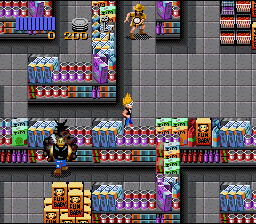
This patch simply allows the player to go backwards through their inventory when holding down the L button, very handy late in the game when you've amassed a decent arsenal. The formerly unused Select button now brings up the victim radar as well as the R button (unchanged from the original game).Screenshots
Contributions
| Contributor | Type of contribution | Description |
|---|---|---|
| Stanley_Decker | Hacking | |
| Sloat | Hacking |
Reviews
| Great hack but could be better | Faydgamer | 2023-08-19 | Version 1.1 |
Highly recommended but I think it would be better if it changed the controls in this manner; R - inventory right. L - inventory left Select - map Having to hold L and press b to go backwards in the inventory is great, but it would feel more modern if you just press R to scroll forward then press L to scroll backwards, and use select for map. Hopefully an update can happen | |||
| I have but one regret: | Board_Avenger | 2019-01-11 | Version 1.0 |
I just wish this had come out *before* I'd written Bloody Disgusting Edition to my personal cartridge! Better get the soldering iron back on again so I can add this to it as well... This is a feature added in Oh No! More Zombies... that significantly improves gameplay so it's great that it's now out as a separate patch for the original game as well. Much appreciated! | |||
| Massive gameplay quality upgrade | FlamePurge | 2019-01-10 | Version 1.0 |
Zombies Ate My Neighbors is a fast-paced run-and-gun third-person shooter. Save the victims as quickly as possible, or die trying. (Or just fail to save all 10 victims, and get a Game Over anyway.) All four face buttons are used for your weapons and sub-items. The Y Button is to attack, the X Button is to use a sub-item, and the A and B Buttons cycle through sub-items and weapons respectively. Only trouble is, while the player is escaping certain doom, they can often overshoot their desired equipment, having to mash the cycle buttons all over again. This patch remedies that. Accidentally pass a weapon you wanted? Stop cycling and hold the L Button down, then press the B Button again! Don't play Zombies Ate My Neighbors without this. It's a life-saving game-changer. Highly recommended by a ZAMN player of 22 years. | |||